---
{
title: "What is React's useFormState and useFormStatus?",
description: "React Server Actions are an awesome way to pass data to and from your React client and server. Like all functions, they need a way to return data.",
published: '2023-12-20T21:52:59.284Z',
authors: ['crutchcorn'],
tags: ['react', 'webdev', 'javascript'],
attached: [],
license: 'cc-by-4',
collection: "react-beyond-the-render",
order: 7
}
---
Thus far in our article series, we've taken a look at how React handles reactivity, server rendering, and how to send data back and forth between our React-based server and our client.
In particular, our last article outlined how we can send data from the server down to the client and back:
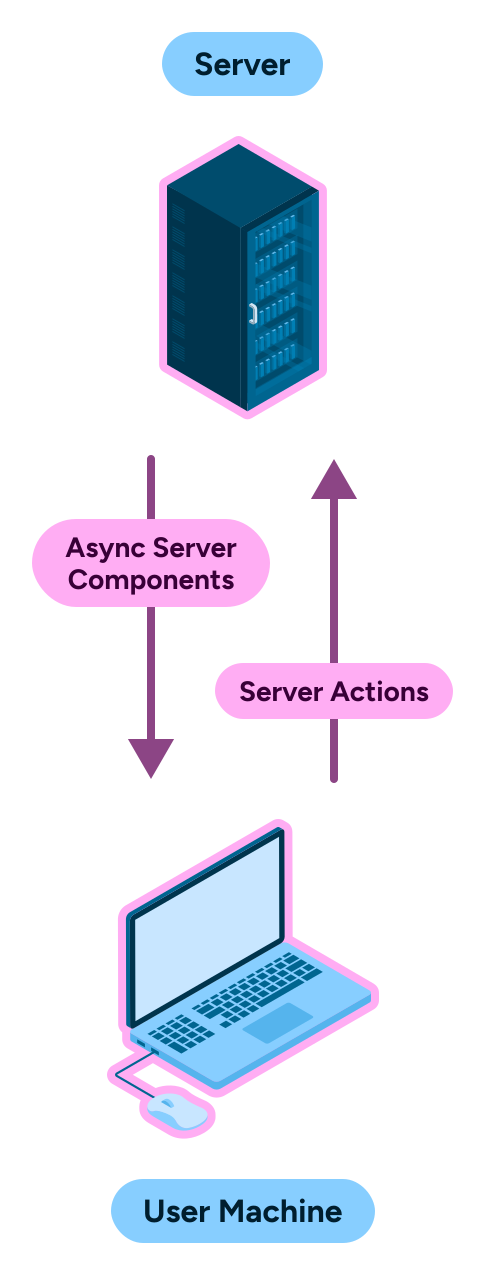
This is a great _almost_ bi-directional communication from [React Server Components](/posts/what-are-react-server-components) and back.
> Why do you say "almost"? What's missing?
Well, once you send an action back to the server, how do you get a response back from the server? What happens if the server action needs to inform you of some status?
Well, this is where `useFormStatus` and `useFormState` come into play:

# What is `useFormStatus`?
`useFormStatus` allows developers to listen for state changes on their React Server Actions. IE: When a server action is pending or not.
While `useFormStatus` isn't directly a way to listen for changes from the server (instead it relies on the information on the client to show its metadata) it allows us to make a nicer user experience by showing a loading indicator while the server is taking its action.
Let's start with a [client-side actions](/posts/what-are-react-server-actions#What-are-React-form-actions) demo:
```jsx
import { useFormStatus } from 'react-dom';
function Submit() {
const status = useFormStatus();
return (
);
}
function App() {
async function waitASecond() {
await new Promise((resolve) => {
setTimeout(() => {
resolve();
}, 1000);
});
}
return (
);
}
```
Here, we're using the `pending` field on `useFormStatus` to tell us when our form is being submitted.
> **A note about `useFormStatus`:**
> You might be wondering why I've extracted the `Submit` component into its own function. This is because `useFormStatus` is a hook that implicitly gathers its state from the parent `
> );
> }
> ```
## `useFormStatus` usage with server actions
But of course it works with server actions as well. Let's adapt our todo list example from our last article:
```jsx
// page.jsx
import { Todo } from "./client";
import { addTodoToDatabase, getTodos } from "./todos";
export default async function Home() {
const todos = await getTodos();
async function addTodo(formData) {
"use server";
const todo = formData.get("todo");
await addTodoToDatabase(todo);
}
return ;
}
```
```jsx
// client.jsx
"use client";
import { useCallback } from "react";
import { useFormStatus } from "react-dom";
function TodoFormInner() {
const status = useFormStatus();
return (
<>
{status.pending &&
);
}
```
# What is `useFormState`?
`useFormState` allows us to get a response from a React Server Action and handle the results any way we might want to; including (but not limited to) displaying the contents of the response to the client.
This is a simple example of what `useFormState` looks like on client-side form actions:
```jsx
function App() {
async function sayHi() {
await new Promise((resolve) => {
setTimeout(() => {
resolve();
}, 1000);
});
return 'Value from the action';
}
// State will be updated when `sayHi` returns a value
const [state, action] = useFormState(sayHi, 'Initial value');
return (
// Pass the action from `useFormState`
);
}
```
We can even implement a simple counter by utilizing the previous state (or initial value if there is no previous state):
```jsx
async function increment(previousState, formData) {
return previousState + 1;
}
function App() {
const [state, action] = useFormState(increment, 0);
return (
)
}
```
> This increment example comes from [the React docs for the Hook](https://react.dev/reference/react-dom/hooks/useFormState#useformstate).
## `useFormState` usage with server actions
While `useFormState` works on the client-side, it's the most useful in conjuncture with server actions.
Let's add some form validation to our todo list application so that the user can't submit an empty field:
```jsx
// page.jsx
import { Todo } from "./client";
import { addTodoToDatabase, getTodos } from "./todos";
import { redirect } from "next/navigation";
export default async function Home() {
const todos = await getTodos();
async function addTodo(previousState, formData) {
"use server";
const todo = formData.get("todo");
if (!todo) return "Please enter a todo";
await addTodoToDatabase(todo);
redirect("/");
}
return ;
}
```
```jsx
// client.jsx
"use client";
import { useFormState } from "react-dom";
export function Todo({ todos, addTodo }) {
const [state, action] = useFormState(addTodo, "")
return (
<>
{todos.map((todo) => {
return
{todo.value}
;
})}
);
}
```
> **Don't forget the API changes:**
>
> Don't forget that `useFormState` requires you to change your server action to include a new first argument for `previousState`. Otherwise you'll get the following error:
>
> ```
> ⨯ app\page.jsx (10:24) @ get
> ⨯ TypeError: formData.get is not a function
> ```
## `useFormState` usage without client-side JavaScript
Because `useFormState` utilizes the `
{todos.map((todo) => {
return
{todo.value}
;
})}
);
}
```
# Conclusion
And with that, that's our article series! We've covered a lot of ground; everything from how React's most fundamental values like reactivity works to advanced bi-directional data flow from the server and back!
Want to keep learning React from lil' ole' me? Well shucks; first thank you for reading!
But I can oblige! [I've written a book called "The Framework Field Guide" that teaches React, Angular, and Vue all-at-once, in-depth, and for free](https://framework.guide). Check it out and let me know what you think.