This fixes a bug in our `@now/build-utils` tests that pair the current build-utils with a stable builder. Since ncc was bundling `@now/build-utils`, we weren't able to configure a different version and these tests were not actually testing the correct version of build-utils.
A nice side-effect is that each builder will be about 50% smaller (compared by measuring `dist`).
* [now-next] Add Support for Prerender v2
* Copy test suite
* Test that fallback doesn't work for fallback: false
* record omitted lambdas
* Improve test case
* improve omitted routes logic
Co-authored-by: kodiakhq[bot] <49736102+kodiakhq[bot]@users.noreply.github.com>
Some build utilities and SSG Frameworks instruct users to set `NODE_ENV=production` which typically means updating `now.json` to the following:
```json
{
"build": {
"env": {
"NODE_ENV": "production"
}
}
}
```
The problem is that this environment variable is assigned during `npm install` or `yarn install` which is the equivalent of running install with the `--production` flag. This flag prevents `devDependencies` from installing. This is almost never what the user intends so they have to remove `now.json` and instead updating their build script to `NODE_ENV=production yarn build`.
This PR improves the experience by deleting `NODE_ENV` during the install step.
This PR fixes `@now/routing-utils` when the input routes are null. It used to return the empty array but now it will still append.
I also added many more tests to `@now/build-utils` when `featureHandleMiss: true` and refactored the code a bit to make dynamic routes and api routes a little more clear.
This PR refactors the rewrites (the dynamic routes as well as the route that prevents directory listing for zero config deployments) so they are not in the `handle: miss` phase.
This is necessary because the behavior of `handle: miss` will change in an upcoming release.
The solution is to separate these into `rewriteRoutes` that can then be merged properly with the user's routes. They will be appended to the `handle: filesystem` phase (or add the phase if it doesn't exist).
* [now-cli] Remove v1 "static build" integration tests
These are the last remaining v1 static type deployments being created.
* Remove from `integration.js` as well
Co-authored-by: kodiakhq[bot] <49736102+kodiakhq[bot]@users.noreply.github.com>
There was a bug in `now-client` when deploying a directory that ends with a slash, for example `/Users/styfle/Code/myapp/` instead of the usual `/Users/styfle/Code/myapp`.
This never affected `now-cli` until we added support for defining the `rootDirectory` which allows the user to type whatever they wish in the Project Settings.
The fix is to use `path.relative()` instead of substring.
The combination of file renaming and brackets doesn't work well for go build so we need to add the file extension back before building.
I also simplified the `.now/cache/folder` logic because it should be the same whether `builds` is defined or not (aka zero config).
The combination of file renaming and brackets doesn't work well for python imports so we need too add the file extension back before importing the python module.
I also simplified the `.now/cache/folder` logic because it should be the same whether `builds` is defined or not (aka zero config).
This updates to not pass segments already used in a redirect's destination query since these values are most likely unwanted and can still be manually added if desired. This change does not affect rewrites and we still pass through all segments in the query
This adds handling for treating `pages/404.js` as the custom error page in Next.js to allow for more flexible auto static optimization on the 404 page. This makes sure we handle `pages/404.js` being a lambda due to `_app` having `getInitialProps` and also makes sure that visiting `/404` doesn't respond with a 200 status code
~We can add tests for this behavior after the below PR has been released in a canary of Next.js~
x-ref: https://github.com/zeit/next.js/pull/10329
x-ref: https://github.com/zeit/next.js/pull/10593
Bumps [codecov](https://github.com/codecov/codecov-node) from 3.1.0 to 3.6.5.
<details>
<summary>Release notes</summary>
*Sourced from [codecov's releases](https://github.com/codecov/codecov-node/releases).*
> ## v3.6.4
> Fix for Cirrus CI
>
> ## v3.6.3
> AWS Codebuild fixes + package updates
>
> ## v3.6.2
> command line args sanitised
>
> ## v3.6.1
> Fix for Semaphore
>
> ## v3.6.0
> AWS CodeBuild
> Semaphore v2
>
> ## v3.3.0
> Added pipe `--pipe`, `-l`
</details>
<details>
<summary>Commits</summary>
- See full diff in [compare view](https://github.com/codecov/codecov-node/commits)
</details>
<details>
<summary>Maintainer changes</summary>
This version was pushed to npm by [drazisil](https://www.npmjs.com/~drazisil), a new releaser for codecov since your current version.
</details>
<br />
[](https://help.github.com/articles/configuring-automated-security-fixes)
Dependabot will resolve any conflicts with this PR as long as you don't alter it yourself. You can also trigger a rebase manually by commenting `@dependabot rebase`.
[//]: # (dependabot-automerge-start)
[//]: # (dependabot-automerge-end)
---
<details>
<summary>Dependabot commands and options</summary>
<br />
You can trigger Dependabot actions by commenting on this PR:
- `@dependabot rebase` will rebase this PR
- `@dependabot recreate` will recreate this PR, overwriting any edits that have been made to it
- `@dependabot merge` will merge this PR after your CI passes on it
- `@dependabot squash and merge` will squash and merge this PR after your CI passes on it
- `@dependabot cancel merge` will cancel a previously requested merge and block automerging
- `@dependabot reopen` will reopen this PR if it is closed
- `@dependabot close` will close this PR and stop Dependabot recreating it. You can achieve the same result by closing it manually
- `@dependabot ignore this major version` will close this PR and stop Dependabot creating any more for this major version (unless you reopen the PR or upgrade to it yourself)
- `@dependabot ignore this minor version` will close this PR and stop Dependabot creating any more for this minor version (unless you reopen the PR or upgrade to it yourself)
- `@dependabot ignore this dependency` will close this PR and stop Dependabot creating any more for this dependency (unless you reopen the PR or upgrade to it yourself)
- `@dependabot use these labels` will set the current labels as the default for future PRs for this repo and language
- `@dependabot use these reviewers` will set the current reviewers as the default for future PRs for this repo and language
- `@dependabot use these assignees` will set the current assignees as the default for future PRs for this repo and language
- `@dependabot use this milestone` will set the current milestone as the default for future PRs for this repo and language
You can disable automated security fix PRs for this repo from the [Security Alerts page](https://github.com/zeit/now/network/alerts).
</details>
When testing, you can set `NOW_BUILDER_DEBUG=1` to print verbose logs from builders.
However, this was causing some tests to fail that depended on a build environment variable.
This PR fixes the assignment so that it preserves the environment variables from the tests by adding `NOW_BUILDER_DEBUG` instead of replacing.
This handles an edge case where deeply nested dynamic routes were handling `_next` 404s that were cached forever since the immutable header we set isn't cleared after not matching on the filesystem.
I updated our cache-header fixture to check for this edge case also to make sure we don't regress on this
Some users wish to put all Go related code in the `/api` directory and the root is reserved for a frontend framework.
This PR adds support for `/api/go.mod` which will act the same as `/go.mod` by moving the file to the root.
This adds support for using the fallback file for dynamic (lazy) SSG pages to allow showing a loading state while the cache is populated with data. We can add tests for this behavior once the below referenced PR is shipped on canary
x-ref: https://github.com/zeit/next.js/pull/10424
~Update: added tests now that fallback support has landed in Next.js although it appears `now-proxy` might need to be updated to revalidate the fallback correctly since the initial fallback is always being shown for lazy SSG pages with these changes~
Looks like this is working properly in `now-proxy` and we were overriding the prerender output with the static page output, thanks @juancampa for helping investigate! 🙏
Previously, `@now/go` would fail when using [Path Segments](https://zeit.co/docs/v2/serverless-functions/introduction#path-segments) since `go build` [doesn't support](https://stackoverflow.com/q/60140859/266535) files that begin with square bracket.
This PR changes the build logic so that the entrypoint file is renamed if if begins with a square bracket.
The output file is not renamed because v3 builders can't rename outputs which works great for this feature.
This adds initial support for Windows in GitHub Actions CI tests.
There is still work to be done to prevent certain tests from hanging in CI so those are skipped for now.
We used to require a `package.json` but we have since introduced [Advanced Project Settings](https://zeit.co/blog/advanced-project-settings) which will ask the user for a build command during the first deploy.
Updates go to the latest version 1.13.7 (https://golang.org/doc/devel/release.html#go1.13). This allows users to use the new error functionality that was introduced in go 1.13 (https://blog.golang.org/go1.13-errors) and also includes a couple of security fixes.
Looking at the last PR that updated the version (https://github.com/zeit/now-builders/pull/247/files) this should be as simple as updating the version number.
P.S. I tried to follow the contribution guidelines, but `yarn lint` fails with `exit code 1`/`295 problems (33 errors, 262 warnings)` and `yarn test` returns `error Command "test" not found` on master. But `yarn test-unit` shows no errors.
* [now-cli] Consider root directory for now.json
* Adjust message check in test
* Fallback if config does not exist as well
* Assign localConfig later and add debug
* Prefere now.json from root directory
* Comment
* Adjust test and add warning
This fixes a regression from #3749 where the PORT env var was removed. This is necessary so frameworks like create-react-app and gatsby can proxy to `now dev`.
Fixes#3761
Previously, the changelog script was looking for the last "Publish Stable" commit, but it should really be looking for the last Stable release of Now CLI.
This PR updates the changelog script so that it fetches the latest GH Release (which should be Now CLI) and then compares that to the HEAD.
This PR changes the behavior of `trailingSlash: true` after we received feedback that files should not be redirected with a trailing slash. This matches the behavior of `serve` and `serve-handler`.
### Examples
* `/index.html` => serve
* `/assets/style.css` => serve
* `/assets` => redirect to `/assets/`
* `/assets/style` => redirect to `/assets/style/`
### Additional
In order to avoid duplicate content, this PR also adds redirects to files without a trailing slash.
* `/about.html/` => redirect to `/about.html`
* `/assets/style.css/` => redirect to `/assets/style.css`
Fixes#3731
* use npx when available
* add --no-install
* replace $PORT and %PORT% in devCommand
* remove PORT from env variables
* replace more than one $PORT or %PORT%
* fix regex
The Hugo theme was lost when transferring from `zeit/now-examples` to `zeit/now`.
This PR fixes the `.gitignore` file to include the `dist` directory and override our root `.gitignore`.
* do not prompt for root directory when linked
* run tests
Co-authored-by: kodiakhq[bot] <49736102+kodiakhq[bot]@users.noreply.github.com>
Co-authored-by: Leo Lamprecht <mindrun@icloud.com>
Typically, Go tests are side-by-side with their source files in a `_test.go`.
The Go documentation says the following:
> To write a new test suite, create a file whose name ends _test.go that contains the TestXxx functions as described here. Put the file in the same package as the one being tested. The file will be excluded from regular package builds but will be included when the “go test” command is run. [View Docs](https://golang.org/pkg/testing/)
This PR excludes the test files from being turned into Serverless Functions.
This PR is a follow up to #3703 which fixes file output renaming on initial boot but not when files are added or removed while `now dev` is running. This PR fixes that behavior.
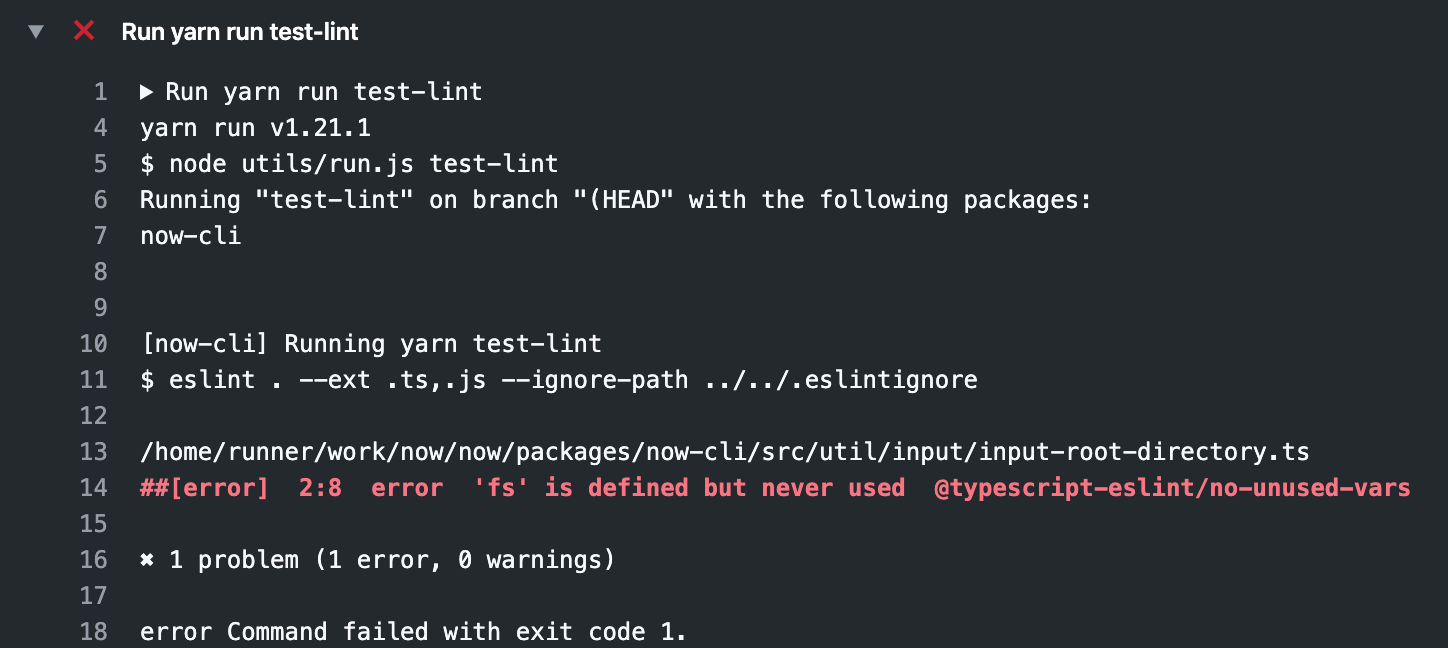
Fixes GH pull request auto-lint:
> #### Check warning on line 2 in `packages/now-cli/src/util/input/input-root-directory.ts`:
>
> ## GitHub Actions / Unit Tests (ubuntu-latest, 12)
>
> `packages/now-cli/src/util/input/input-root-directory.ts#L2`
>
> ```
> 'fs' is defined but never used
> ```
This PR adds a `config.excludeFiles` pattern for `@now/python` that defaults to `node_modules/**` for users who are using a Node.js SSG frontend with Python APIs backend.
If the user chooses, they can override to any glob pattern such as `{.cache,node_modules}/**`.
Related to #2830
Related to #3416
There was a bug where python src files were being renamed when it really should be the output files only.
This is a tricky bug because production deployments build all files first and then perform routing. So we simply rename lambda outputs with prod deployments. But `now dev` matches a request URL to a build before performing the build lazily so we have to rename source files.
The solution is to add both the original file name and the renamed file name in the `files` map so that it matches correctly but `zeit/fun` will still copy the original source files in the output correctly.
Routing will match on the extensionless file, the builder will use the file with extension (it doesn't know about file renaming), then the build results in a lambda output which is renamed to extensionless.
I added a test for `@now/python` and updated the `@now/bash` test.
Fixes#3638
* [now-cli] Add support for the `rootDirectory` property
* Only check if rootDirectory exists
* Add test
* Support now dev
* Use defaults
* Comment
* Normalize the path input
* Adjust test
* Remove .only
* Adjust more tests
* Adjust test
* Fix test
* Remove unused import
* Update packages/now-cli/src/util/validate-paths.ts
Co-Authored-By: Luc <luc.leray@gmail.com>
* Run check on normalized path
* Add more checks
* Change error message
* Use basename as prefix
* Use correct path when linking
* Update packages/now-cli/src/util/input/input-root-directory.ts
Co-Authored-By: Luc <luc.leray@gmail.com>
Co-authored-by: Luc <luc.leray@gmail.com>
* [tests] Run unit tests on ubuntu and macos
* Add back Node 10 for Now CLI Tests
Co-authored-by: kodiakhq[bot] <49736102+kodiakhq[bot]@users.noreply.github.com>
This enables case sensitive rewrites and redirects. It also changes the delimiter to `/` to match Next.js.
Unlike `routes` which were case insensitive, `rewrites` and `redirects` are case sensitive.
In the future, we may wish to add an option to toggle the sensitivity.
* use .now scope for commands
* add cache to getUser
* add cache on getTeams
* add cache for link
* refactor
* add error if NOW_ORG_ID is missing
* remove link cache
* refactor
* fix whoami
* add tests
* move fetching scope/org after subcommand condition
* Update packages/now-cli/src/util/projects/link.ts
Co-Authored-By: Andy <AndyBitz@users.noreply.github.com>
* remove userId from global scope
* show team and user in whoami command
* reset whoami
* Revert "move fetching scope/org after subcommand condition"
This reverts commit d145e6164074fe2442178cd8fafbeb225c978b9c.
* remove `client` from main scope
* tests adjustments
* adjust tests
* adjust tests (bis)
Co-authored-by: Andy <AndyBitz@users.noreply.github.com>
Co-authored-by: kodiakhq[bot] <49736102+kodiakhq[bot]@users.noreply.github.com>
This PR changes the behavior so that `:segment` in the `source` is always added to the query string unless the `destination` query string already contains a key with the same name.
* deprecate uploading files instead of erroring
* fix misc bugs
* remove final `.`
* add test
* check .now folder does not exist in test
* clean up after test
Deployments no longer support Node 8 since reaching EOL so we can also drop all of the special casing used to support Node 8 in Now CLI and Now Client.
The `tsconfig.json` has been updated to ES2018 per [Node-Target-Mapping](https://github.com/microsoft/TypeScript/wiki/Node-Target-Mapping).
* Checkout master on master
* Check if checkout works
* Revert "Check if checkout works"
This reverts commit 66f712a43edfb938c551110c214661e4a920b492.
* Revert "Checkout master on master"
This reverts commit 41b6eab926474830629e758a51e7cfdd1947bdf2.
* Use --depth=10
* Add another fetch
* Initial Build step
* Typo
* Remove circleci config
* Fix command
* Change Node version
* Add unit tests
* Use artifact
* Fix workflow file
* Remove node_modules
* Remove .git
* Do not upload files
* Checkout master branch
* Use git fetch
* Add now-dev tests
* Fix workflow file
* Use node10 for building
* Use node12 for building
* Download Hugo before building
* Fetch master branch
* Do not cancel other jobs when one fails
* Add all tests
* Remove needs
* Add build step
* Move test up
* Use isCanary function and remove tests
* Update Publish workflow
* Update .github/workflows/continuous-integration.yml
Co-Authored-By: Steven <steven@ceriously.com>
* Specify more events
* Add publish.sh script
* Remove Node8
Co-authored-by: Steven <steven@ceriously.com>
* [now-client][now-cli] Remove builds check from now-client
* [now-client] Adjust README and change version
* Change events and adjust build error
* Use message from error
* Update packages/now-cli/src/util/deploy/process-deployment.ts
Co-Authored-By: Luc <luc.leray@gmail.com>
* [now-cli] Rename event
* Make types more consistent
* Fix type in process-legacy-deployment
* Adjust type in test
* Update type
* Make events type simpler
Co-authored-by: Max <8418866+rdev@users.noreply.github.com>
Co-authored-by: Luc <luc.leray@gmail.com>
This PR a regression when path segments are used in the query string.
Take a look at the following ASCII Table for why I had to delete certain parts of the parsed url before formatting again.
https://nodejs.org/api/url.html#url_url_strings_and_url_objects
Related to #3539
This adds support for `headers` in custom-routes which was landed in Next.js.
This also updates `@now/routing-utils` `convertHeaders` to call `sourceToRegex` to match behavior with Next.js and allow using `segments` to match in the header `source` as not being able to use the same syntax for a header `source` as a `redirect` source could get confusing
This is required to match custom-routes behavior in Next.js by checking dynamic routes after each rewrite although is currently blocked on `now dev` also supporting the feature
This reverts commit 0da98a7f5d.
- [x] Add tests from now-proxy for `handle: miss`
- [x] Add tests from now-proxy for `handle: hit`
- [x] Add file output renaming when `featHandleMiss` is true (also assign true for now dev)
This adds initial support for static 404 pages when enabled for Next.js applications > `9.2.1-canary.3` it also disables tracing/logging related to lambdas when there aren't any lambdas besides the `_error` when a static 404 is being used
Closes: #3368
I was getting errors when running `yarn build` locally because the public directory already exists.
This will make sure the public directory is deleted before generating it again.
This adds `permanent: boolean` to the redirects in the custom-routes tests for `@now/next` since this field is required for redirects in Next.js in the latest version
unblocks: https://github.com/zeit/now/pull/3613
This PR adds `NOW_PROJECT_ID` and `NOW_ORG_ID` environment variables as a way to specify a project to deploy to when running `now`.
eg.
```
NOW_ORG_ID=abc NOW_PROJECT_ID=123 now
```
When using these environment variables:
- the folder is not linked to the project (ie. no `.now` is created)
- we interrupt the process and show an error message if the project is not found:

Since v2 deployments are auto-assigned aliases, render as such to match more closely to the v2 pipeline when a static deployments was implicitly upgraded to the v2 platform.
* [api] Add Sentry
* Use function name
* Add test error
* Revert "Add test error"
This reverts commit 39cf8a61dad9fcdcb616e418a0deb6ffe9e04ea9.
* Revert "Revert "Add test error""
This reverts commit c718f201da9d80743319ac87e0d4560e718fff53.
* Add logging
* Revert "Add logging"
This reverts commit 39cd46c8bbeef9024e71fe70478068480a51545b.
* Revert "Revert "Revert "Add test error"""
This reverts commit e6f63ee21fabb4ac8fc065b74281dbcdf5811216.
* Ignore .env
* Use init function for Sentry inline
* Print warnings / notices from the API
* Print `v2` instead of `v1` when upgraded to v2
* Wait for "alias-assigned" event in v1 pipeline when upgraded to v2
This PR updates the framework auto-detection flow in `deploy` command to not show "overwrite project settings?" prompt when the API returns a `framework` property that is `null`.
In a previous release, we pinned the node version to the project so that we could upgrade new projects to a newer version of Node.js while maintaining backwards compatibility with existing projects.
This puts some burden on the user when they're deployment is a year old and their pinned version of Node reaches EOL. Because we currently force the user to add a package.json.
This PR changes the behavior so projects are no longer pinned. Instead, newer deployments get the latest Node unless they opt-in and pin via package.json.
* fix "in your organization"
* add feedback link to canary version prompt
* `Detecting framework` -> `Setting up project`
* "Auto-detect project settings (<framework>)"
* "What’s your project’s name?"
* ✅ -> ☑️
* "organizations" -> "scope"
* always show feedback prompt for `now dev`
* dim feedback prompt
* [now-build-utils] Error for unused `functions`
* Update packages/now-build-utils/src/detect-builders.ts
Co-Authored-By: Steven <steven@ceriously.com>
Co-authored-by: Steven <steven@ceriously.com>
This behavior is legacy from the very early days of `now dev`
(before the `files` array was returned from Runtimes) and adds
complexity. We can remove it at this point to simplify dev server.
Co-authored-by: Andy <AndyBitz@users.noreply.github.com>
Co-authored-by: Leo Lamprecht <mindrun@icloud.com>
* Revert "[frameworks] Fix import in test (#3570)"
This reverts commit 9ee86df69d.
* Revert "[frameworks] Rename frameworks to now-frameworks (#3569)"
This reverts commit daa5cbdd4b.
@@ -94,3 +94,12 @@ Sometimes you want to test changes to a Builder against an existing project, may
4. Run `now *.tgz` to upload the tarball file and get a URL
5. Edit any existing `now.json` project and replace `use` with the URL
6. Run `now` or `now dev` to deploy with the experimental Builder
## Add a New Framework
You can add support for a new Framework by creating a Pull Request for this repository and following the steps below:
1. Add the Framework to the `@now/frameworks` package: The file is located in `packages/frameworks/frameworks.json`. You can copy the structure of an existing one and adjust the required fields. Note that the `settings` property either contains a `value` or a `placeholder`. The `value` property is used when something is not configurable, the `placeholder` is used when something is configurable and can be changed with configuration. An example would be the Output Directory for Hugo, it's `public` by default but can be changed through its config file, so we use `placeholder` with an explanation of what can be used.
2. Add an example to the `examples/` directory: The name of the directory should equal the slug of the framework used in `@now/frameworks`. The `.github/EXAMPLE_README_TEMPLATE.md` file can be used to create a `README.md` file for the example.
3. Update the `@now/static-build` package: The file `packages/now-static-build/src/frameworks.ts` has to be extended. You can add default routes that will always be applied to projects that use this Framework or specify some paths that will be cached to speed up the build process.
4. After your Pull Request has been merged and released, other users can select the example on the ZEIT Now dashboard and deploy it.
This directory is a brief example of a [Name](site-link) site that can be deployed with ZEIT Now and zero configuration.
## Deploy Your Own
Deploy your own [Name] project with ZEIT Now.
[](https://zeit.co/import/project?template=https://github.com/zeit/now-examples/tree/master/example-directory)
### How We Created This Example
To get started with [Name] on Now, you can use the [CLI Tool Used](CLI-link) to initialize the project:
```shell
$ now init charge
```
### Deploying From Your Terminal
Once initialized, you can deploy the [Name] example with just a single command:
This is the public list of examples for **ZEIT Now**.
All of these ready to deploy examples feature a frontend framework or static site, created with zero configuration using the CLI tools they provide.
The `+functions` examples feature an `/api` directory as well, highlighting how to use serverless functions on top of a framework, again with zero configuration required.
## What is ZEIT Now?
ZEIT Now is a cloud platform for static frontends and serverless functions. It enables developers to host websites and web applications that deploy instantly, scale automatically, and require no supervision.
## What Does this Repository Contain?
This repository consists of multiple examples, created for use with the [ZEIT Now](https://zeit.co/now) platform. In addition to this, it also contains:
- [Code of Conduct](https://github.com/zeit/now/blob/master/.github/CODE_OF_CONDUCT.md) - our Code of Conduct, adapted from the [Contributor Covenant](http://contributor-covenant.org)
- [Contributing Guidelines](https://github.com/zeit/now/blob/master/.github/CONTRIBUTING.md) - a guide on how to contribute to the Now Examples repository
- [License](https://github.com/zeit/now/blob/master/LICENSE) - the standard MIT license under which these examples are published
We recommend familiarizing yourself with the above sections, particularly if you are looking to make a contribution.
## Deploying Examples
To get started using any of these examples as your own project, [install Now](https://zeit.co/download) and use either of the following commands in your terminal:
```sh
now init # Pick an example in the CLI
now init <example> # Create a new project from a specific <example>
now init <example> <name> # Create a new project from a specific <example> with a different folder <name>
```
Deploying your project takes seconds and can be done with **just a single command**:
```sh
now # Deploys the project with Now
```
With the `now` command, your project will be built and served by Now, providing you with a URL that can be shared immediately.
## New Examples
We are continuously improving our examples based on best practices and feedback from the community. As a result, it is possible that example names will change and on occasion deprecated in favor of an improved implementation.
For example, the previous `nodejs` example showed a static frontend with a Node.js API. This is illustrated now in the `svelte` example. Below is a table that lists some of the most popular previous examples and the equivalent replacement:
If you have an existing project you would like to deploy with ZEIT Now, we recommend reading our guide on [migrating to Now and zero configuration](https://zeit.co/guides/migrate-to-zeit-now/). By combining the guide with this repository, you will quickly be able to understand how to deploy your application.
If you would like to upgrade a project to take advantage of zero configuration, you may find the [upgrade guide](https://zeit.co/guides/upgrade-to-zero-configuration/) useful. The upgrade guide covers how to remove configuration from existing projects along with how to use the `/api` directory.
## How to Contribute
Contributing to Now Examples should be an enjoyable experience, as such we have created a set of [contributing guidelines](https://github.com/zeit/docs/blob/master/CONTRIBUTING.md) to help you do so.
The guidelines cover important information such as the requirements for new examples and where to get help if you have any questions.
We have tried to make contributing to Now Examples as easy as possible, especially for those new to Open Source. If anything is unclear or you have any questions then please reach out to us on [ZEIT Spectrum](https://spectrum.chat/zeit) where we will do our best to help you.
## Reporting Issues
We actively encourage our community to raise issues and provide feedback on areas of Now Examples that could be improved.
An issue can be raised by clicking the 'Issues' tab at the top of the repository, followed by the Green 'New issue' button.
When submitting an issue, please thoroughly and concisely describe the problem you are experiencing so that we may easily understand and resolve the issue in a timely manner.
## License
Now Examples is an open source project released under the [MIT License](https://github.com/zeit/docs/blob/master/LICENSE.md).
## Get In Touch
If you have any questions that are not covered by raising an issue then please get in touch with us on the [ZEIT Spectrum](https://spectrum.chat/zeit). There you will find both members of the community and staff who are happy to help answer questions on anything ZEIT related.
[](https://spectrum.chat/zeit)
This directory is a brief example of a [React](https://reactjs.org/) app with [Serverless Functions](https://zeit.co/docs/v2/serverless-functions/introduction) that can be deployed with ZEIT Now and zero configuration.
## Deploy Your Own
Deploy your own React project, along with Serverless Functions, with ZEIT Now.
[](https://zeit.co/new/project?template=https://github.com/zeit/now-examples/tree/master/create-react-app-functions)
To get started with React, along with [Serverless Functions](https://zeit.co/docs/v2/serverless-functions/introduction), with ZEIT Now, you can use the [Create-React-App CLI](https://reactjs.org/docs/create-a-new-react-app.html#create-react-app) to initialize the project:
```shell
$ npx create-react-app my-app
```
### Deploying From Your Terminal
You can deploy your new React project, along with [Serverless Functions](https://zeit.co/docs/v2/serverless-functions/introduction), with a single command from your terminal using [Now CLI](https://zeit.co/download):
This directory is a brief example of a [React](https://reactjs.org/) app that can be deployed with ZEIT Now and zero configuration.
This directory is a brief example of a [React](https://reactjs.org/) app with [Serverless Functions](https://zeit.co/docs/v2/serverless-functions/introduction) that can be deployed with ZEIT Now and zero configuration.
## Deploy Your Own
Deploy your own React project with ZEIT Now.
Deploy your own React project, along with Serverless Functions, with ZEIT Now.
[](https://zeit.co/new/project?template=https://github.com/zeit/now-examples/tree/master/create-react-app)
[](https://zeit.co/import/project?template=https://github.com/zeit/now/tree/master/examples/create-react-app-functions)
To get started with React, you can use the [Create-React-App CLI](https://reactjs.org/docs/create-a-new-react-app.html#create-react-app) to initialize the project:
To get started with React, along with [Serverless Functions](https://zeit.co/docs/v2/serverless-functions/introduction), with ZEIT Now, you can use the [Create-React-App CLI](https://reactjs.org/docs/create-a-new-react-app.html#create-react-app) to initialize the project:
```shell
$ npx create-react-app my-app
@@ -22,7 +22,7 @@ $ npx create-react-app my-app
### Deploying From Your Terminal
You can deploy your new React project with a single command from your terminal using [Now CLI](https://zeit.co/download):
You can deploy your new React project, along with [Serverless Functions](https://zeit.co/docs/v2/serverless-functions/introduction), with a single command from your terminal using [Now CLI](https://zeit.co/download):
@@ -6,7 +6,7 @@ This directory is a brief example of using a Custom Build script that can be dep
Deploy your own Custom Built project with ZEIT Now.
[](https://zeit.co/new/project?template=https://github.com/zeit/now-examples/tree/master/custom-build)
[](https://zeit.co/import/project?template=https://github.com/zeit/now/tree/master/examples/custom-build)
This directory is a brief example of a [Gatsby](https://www.gatsbyjs.org/) app with [Serverless Functions](https://zeit.co/docs/v2/serverless-functions/introduction) that can be deployed with ZEIT Now and zero configuration.
## Deploy Your Own
Deploy your own Gatsby project, along with Serverless Functions, with ZEIT Now.
[](https://zeit.co/new/project?template=https://github.com/zeit/now-examples/tree/master/gatsby-functions)
To get started with Gatsby on Now, you can use the [Gatsby CLI](https://www.gatsbyjs.org/docs/gatsby-cli/) to initialize the project:
```shell
$ gatsby new gatsby-site
```
### Deploying From Your Terminal
You can deploy your new Gatsby project, along with [Serverless Functions](https://zeit.co/docs/v2/serverless-functions/introduction), with a single command from your terminal using [Now CLI](https://zeit.co/download):
This directory is a brief example of a [Gatsby](https://www.gatsbyjs.org/) app that can be deployed with ZEIT Now and zero configuration.
This directory is a brief example of a [Gatsby](https://www.gatsbyjs.org/) app with [Serverless Functions](https://zeit.co/docs/v2/serverless-functions/introduction) that can be deployed with ZEIT Now and zero configuration.
## Deploy Your Own
Deploy your own Gatsby project with ZEIT Now.
Deploy your own Gatsby project, along with Serverless Functions, with ZEIT Now.
[](https://zeit.co/new/project?template=https://github.com/zeit/now-examples/tree/master/gatsby)
[](https://zeit.co/import/project?template=https://github.com/zeit/now/tree/master/examples/gatsby)
To get started with Gatsby for deployment with ZEIT Now, you can use the [Gatsby CLI](https://www.gatsbyjs.org/docs/gatsby-cli/) to initialize the project:
To get started with Gatsby on Now, you can use the [Gatsby CLI](https://www.gatsbyjs.org/docs/gatsby-cli/) to initialize the project:
```shell
$ gatsby new gatsby-site
@@ -22,7 +22,7 @@ $ gatsby new gatsby-site
### Deploying From Your Terminal
You can deploy your new Gatsby project with a single command from your terminal using [Now CLI](https://zeit.co/download):
You can deploy your new Gatsby project, along with [Serverless Functions](https://zeit.co/docs/v2/serverless-functions/introduction), with a single command from your terminal using [Now CLI](https://zeit.co/download):
description:`Kick off your next, great Gatsby project with this default starter. This barebones starter ships with the main Gatsby configuration files you might need.`,
author:`@gatsbyjs`,
title:'Gatsby + Node.js (TypeScript) API',
},
plugins:[
`gatsby-plugin-react-helmet`,
{
resolve:`gatsby-source-filesystem`,
options:{
name:`images`,
path:`${__dirname}/src/images`,
},
},
`gatsby-transformer-sharp`,
`gatsby-plugin-sharp`,
{
resolve:`gatsby-plugin-manifest`,
options:{
name:`gatsby-starter-default`,
short_name:`starter`,
start_url:`/`,
background_color:`#663399`,
theme_color:`#663399`,
display:`minimal-ui`,
icon:`src/images/gatsby-icon.png`,// This path is relative to the root of the site.
name:'Gatsby + Node.js (TypeScript) API',
short_name:'Gatbsy + Node.js (TypeScript)',
start_url:'/',
icon:'src/images/gatsby-icon.png',
},
},
// this (optional) plugin enables Progressive Web App + Offline functionality
// To learn more, visit: https://gatsby.dev/offline
Some files were not shown because too many files have changed in this diff
Show More
Reference in New Issue
Block a user
Blocking a user prevents them from interacting with repositories, such as opening or commenting on pull requests or issues. Learn more about blocking a user.